


Key Highlights
- Designed for beginners, Lite Mode removes complex charts and jargon to lower the barrier for new users.
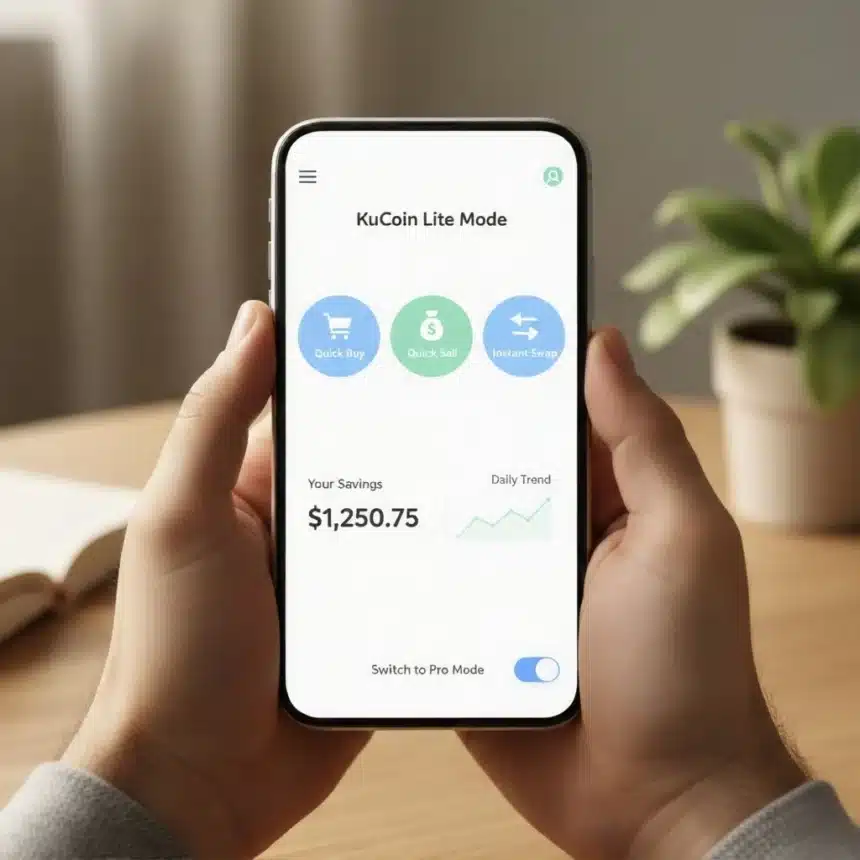
- It focuses on three simple actions: Quick Buy, Quick Sell, and Instant Swapping of digital assets.
- The interface provides an extremely clean and easy-to-read overview of users’ total savings and basic price trends.
- Users can seamlessly switch to the advanced ‘Pro Mode’ when they feel ready to access high-level trading tools.
Have you ever tried to learn something new, only to find the textbook looked more like a complex engineering manual? That’s exactly how millions of people felt whenever they tried to enter the exciting world of digital assets, often called cryptocurrency.
For too long, the platforms used to buy and sell this digital money were designed by experts, for experts. When a newcomer opened the app, they were immediately faced with a barrage of confusing screens. Imagine walking into a giant airplane cockpit when all you wanted to do was drive a scooter. You’d see charts that zipped up and down, full of weird lines and indicators, and confusing words like “derivatives,” “leverage,” and “spot trading.” It felt less like a financial opportunity and more like an impossible math test. Most people, understandably, just gave up.
This massive wall of confusion was a problem KuCoin, one of the world’s largest places to deal in digital money, decided to fix. Their solution is brilliant in its simplicity: KuCoin Lite Mode. This isn’t just a small change; it’s a complete redesign that transforms the confusing cockpit into a friendly, welcoming living room. This new mode is built specifically for people who are just starting out, offering a clear, gentle path into handling digital wealth.
The Solution Arrives: Meet the Easy Button
KuCoin Lite Mode is based on a key idea: you shouldn’t need a university degree to manage your savings. The platform strips away all the excess information that causes panic and confusion. It doesn’t get rid of the complex tools entirely; it just tucks them neatly out of sight until you decide you need them.
This focus on simplicity is like having a helpful guide holding your hand. The whole experience feels less like complicated stock market betting and more like using a modern app to manage your everyday finances. The screen is clean, the steps are clear, and the actions are limited to the most important things you need to do to start.
A Clean Kitchen: What You See First
When you open the Lite Mode, you are immediately relieved by how uncluttered everything is. The layout is designed to be completely intuitive. Instead of struggling to find a small button in a massive collection of menus, you are greeted by three main, obvious paths.
The first thing you see is a clear display of the big names in digital money (like Bitcoin), showing their current price in big, easy-to-read numbers. You also get a simple, general overview of how your own savings are doing. The goal is clarity at a glance, allowing you to instantly feel in control, rather than overwhelmed.
The Three Core Tasks: How You Handle Your Money
Lite Mode distills the entire digital money experience down to three simple actions. These are the building blocks you need to confidently manage your digital wealth:
- Quickly Buy: This is your direct lane to ownership. You decide how much regular cash you want to use, and the platform instantly helps you turn it into the digital coin of your choice. You can use your bank card or transfer funds just like you would on any shopping website. It makes the scary first purchase feel completely natural.
- Quickly Sell: When you are ready to turn your digital assets back into regular money, this button handles the conversion instantly and guides the funds safely back to your bank account. No complicated steps, just simple withdrawal.
- The Instant Swap: Let’s say you own some of one kind of digital coin and now want to try another. Instead of making you sell the first one and then buy the second one two separate steps Lite Mode lets you execute an “Instant Swap.” It’s a fast, simple exchange that changes one digital asset directly into another with a single click, saving you time and avoiding confusing trading screens.
Easy Peasy Savings Tracker: Keeping Score
One of the most important features is the way Lite Mode lets you look at your money. It centralizes all your funds into one easy-to-view area (your ‘main money pot’). You don’t have to check multiple places to know how much you own.
This area gives you a simple, total value of all your holdings combined. Crucially, the charts it uses to show you how your money is performing are basic and easy to interpret. They show you the general path of your investment up, down, or flat not the complex, rapid fluctuations meant for day-to-day speculators. This helps you focus on the long-term health of your savings, reducing the temptation to constantly worry about tiny price movements.
Switching to the Master Control Panel: Growing Up
The cleverest part of KuCoin Lite Mode is that it is not a dead end. It lives inside the main KuCoin application, acting as your training ground.
Once you have spent time buying, selling, and swapping, and you feel genuinely confident, you can move on. With the flip of a switch, you instantly gain access to the KuCoin Pro Mode. This is the master control panel where all the high-level tools, complicated charts, advanced analysis features, and high-risk strategies reside.
You don’t need to download anything new or move your savings. Lite Mode simply steps back, giving you full access to everything KuCoin offers when you are ready. It empowers you to graduate at your own speed, making the transition from total beginner to informed user seamless and unintimidating. KuCoin Lite Mode is the clearest sign yet that the digital money world is finally opening its doors, inviting everyone in with a simple, friendly wave.